Resources are the materials you share with clients, such as guided meditations, breathing techniques and worksheets. Every Pro Activity you share comes from a resource, so add a resource first when you want to share something new.
Note: All clients, names, emails, appointments and other data shown in the screenshots are sample data we created for this guide. They are not real people or real records.
When to use this
- You want to share a new exercise, video, audio or document with clients.
- The activity you want isn’t in the Resource list when you share a Pro Activity.
Steps
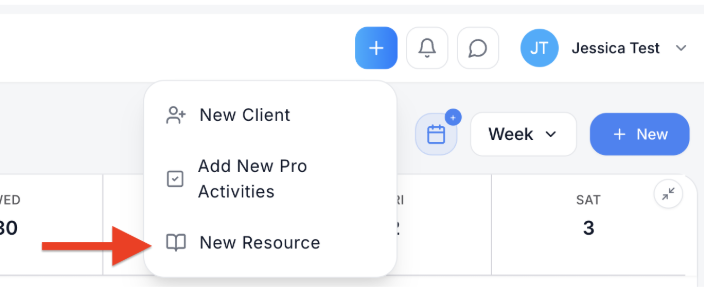
1. Click the blue + button at the top of the screen, then choose New Resource. The Add New Resource window opens.
2. Enter a Resource title. This is the name you and your clients will see, for example Yoga Nidra.
3. Optional: add a Description.
4. Click Resource type and choose the type of resource.
5. Add the resource itself. Click Upload file to upload it from your computer, or Use link to add a web link instead.
6. Under Categories, add the topics the resource helps with, for example ADHD, Sleep-Problems or Paranoia. Categories help you find the right resource later.
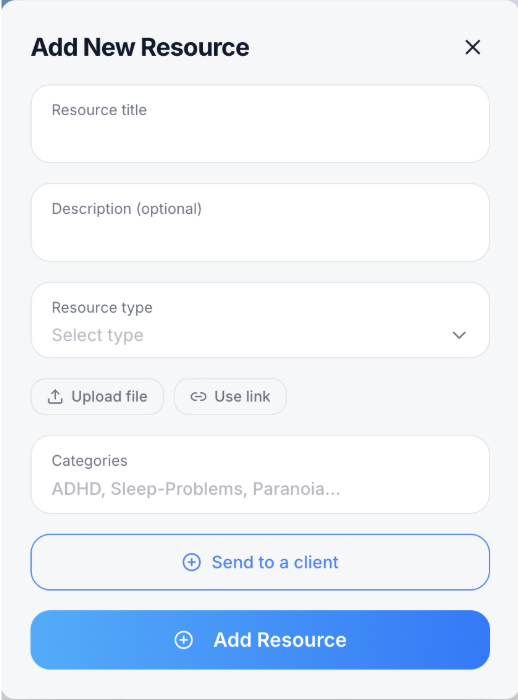
7. Click Add Resource. The resource is added to your library. It then appears in the Resource list when you share a Pro Activity. To share it with a client straight away, click Send to a client before you add it.

